One brief, separate posts for Facebook, X and LinkedIn: how an AI agent does it
Yes. AutomateSocials turns one brief into a separate post for each network: a short version for X, a fuller one for LinkedIn, and a Facebook post that can carry the link in a first comment. It shows what will go where, you confirm once, and it publishes or schedules every version. Publishing is free except X.
What one brief looks like
A brief is the same kind of note you would give a colleague: what you want to say, who it is for, and how you want it to sound. You write it in plain words, in the AutomateSocials app or from an AI assistant connected to the same project.
On 20 October 2026 we ran this in our own AutomateSocials project, from Claude: plan a month of posts for solo founders with no time for marketing, then write the first post for Facebook, X and LinkedIn in our brand voice. This is what the agent wrote. It is our own brand, not a customer story.
On Facebook it opened with the founder's week:
You know you should post every week. You also know the week will end before you get to it.
On X it squeezed the same idea into one line:
No time for marketing? Write one brief in plain words: who you help, what they should know, how you sound.
On LinkedIn it went longer and closed on a point of view:
The part you keep is the part that needs you: deciding what to say.
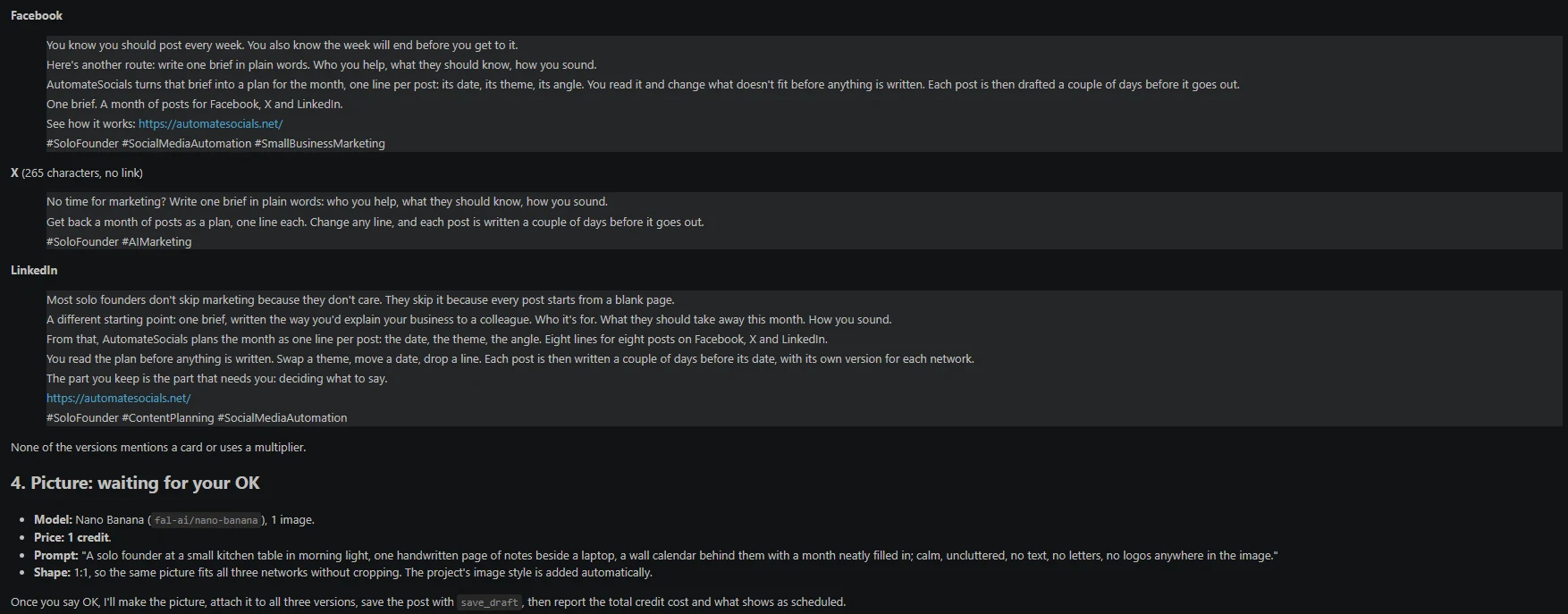
What stayed the same: the idea, and the plain, direct tone. What changed: the length and the opening line, one per network. The X version had no link; the Facebook and LinkedIn versions pointed to our website. How that voice is shaped is in Can an AI write your social media posts in your brand voice?.
How the agent words it per network
Write one idea and ask for it on the networks you use. The agent writes a variant for each: up to 280 characters for X, a fuller version for LinkedIn, and a Facebook post that can carry a first comment, a good home for a link. X posts can carry a thread.
The same request can also cover Instagram, TikTok and YouTube. Instagram and TikTok versions need a picture or a video, since neither network has text-only posts. A YouTube version needs a vertical or square video, because a Short is a video.
Each version respects its network's limits. Where a network's limit is shorter than what you wrote, the agent tells you instead of cutting silently. You can review and edit each version before publishing, in the chat or inline under Posts. Editing keeps the same draft and its number; nothing is duplicated.
- A variant per network, worded to that network's habits and limits
- Threads on X; a first comment on Facebook and LinkedIn
- Pictures and video checked against each network's size, format and length limits before publishing
- Per-network status and the public link once each version is live
You confirm once, then it publishes or schedules
Publishing always asks first: the agent shows what will go where, and you confirm once. The post then goes out now, at a time you name, or in the next free slot of your schedule. Each network's size, format and length limits for pictures and video are checked before publishing.
A workflow that publishes on a schedule is the exception you choose: you approve it when you start it, and you can pause it at any time. The posts it publishes are measured like any others.
Weekly slots
AutomateSocials does not guess your audience's best hour. You give a project weekly publishing slots, for example Monday, Wednesday and Friday at 9:00, in the project's time zone. "Put it in the next free slot" fills them in order. You can also name an exact time for any post, such as Tuesday at 8.
Every published post is measured over its first month, so you can later ask which posts did better on each network and look at when they went out. Campaigns can place their posts on the same slots.
Turning it into a month
The same brief can become a dated month of posts, with each one written a few days before its date. That half of the question is answered in Which AI agent can turn one brief into a month of social posts?. This page stays on the network half: one brief, a version for Facebook, X and LinkedIn.
What it costs
There is no subscription. Writing, scheduling and publishing to Facebook, Instagram, LinkedIn, TikTok and YouTube are free. X is the exception: an X post costs 1 credit, or 8 when it contains a link. The confirmation states the price.
You get 50 free credits when you confirm your email, and credits never expire. Credits also pay for pictures, video and reading other feeds. For the pack prices and the cost of one picture or clip, see Credits and pricing.
If you want a side-by-side with classic schedulers, see AutomateSocials vs Buffer vs Hootsuite vs Later: scheduler or agent?.
FAQ
Can one brief become posts for Facebook, X and LinkedIn at once?
Yes. You give AutomateSocials one brief and ask for those networks. It writes a short version for X, a fuller one for LinkedIn, and a Facebook post that can carry the link in a first comment, then shows you all three to confirm.
Does it post the same text everywhere?
No. It writes a version per network, shortened or expanded to that network's limits and habits. Where a limit is shorter than what you wrote, it tells you instead of cutting silently.
Do I have to approve every post?
When you publish or schedule a draft, the agent shows what will go where and you confirm once. A workflow that publishes is the exception you choose: you approve it when you start it, and you can pause it at any time.
Can it schedule a month ahead?
Yes. The same brief can become a dated month of posts, with each one written a few days before its date. That half of the question is in Which AI agent can turn one brief into a month of social posts? at https://automatesocials.net/blog/30-day-social-media-content-plan-ai.
What does publishing cost?
Writing, scheduling and publishing to Facebook, Instagram, LinkedIn, TikTok and YouTube are free. An X post costs 1 credit, or 8 when it contains a link. You get 50 free credits when you confirm your email, and credits never expire.
Write your first week from one brief: start free with 50 credits
Give the agent one brief, review a version for each network, and confirm once.
Start free with 50 creditsRelated articles
All articlesThe Complete Guide to AI Social Media Automation in 2026
What AI social media automation involves today: one agent that writes, makes pictures, plans campaigns, publishes to six networks, reads other accounts' posts and tells you which post worked, while you approve what goes out.
Read TutorialHow a solo founder keeps posting every week (without a marketing team)
Brief AutomateSocials once a month, approve per-network drafts in one sitting, and schedule them. Writing, scheduling and publishing are free.
Read TutorialWhich AI agent can turn one brief into a month of social posts?
AutomateSocials turns one plain-words brief into a dated month of posts for Facebook, X and LinkedIn, writing each a few days ahead. You approve.
Read